

Overview
All time
Recent Negotiations
All time
Deal Funnel (agreed redeemed) Live
This Month's Billing
Performance
Recent Negotiations
Top Products
All Negotiations Live
Product Rules
Add a new rule
Rule activity
Every change to a product rule, and who made it. Useful when more than one person on your team can edit pricing.
Not on Shopify?
If your store runs on WooCommerce, Squarespace, Wix, or any custom site — copy the snippet below and paste it into your HTML just before the closing </body> tag on every product page.
How to install
- Copy the snippet above
- Open your theme or template editor
- Paste it just before
</body>on your product pages - Save and publish — Flux will appear automatically
Need help? Hit the chat button below and we'll get it installed for you.
Stripe Connect
Connect your Stripe account so Flux can handle commission, refunds, and disputes automatically.
Your plan
Move to a paid plan to lower your commission — Growth cuts it to 1.5%, Pro to 0.5%. Growth and Pro include a 14-day free trial on the plan fee (once per store — if you've used it before, billing starts today), and commission still applies during the trial. Prices show in USD and bill in your store currency; switching plans replaces your current one, never stacks.
Negotiations this month
Loading your usage…
How billing works
Free to start
The Basic plan has no monthly fee and no contract — you only pay a 5% commission when a customer completes a purchase using a negotiated discount code.
Lower your rate
On Growth ($69/mo) commission drops to 1.5%. On Pro ($299/mo) it's 0.5% — the lowest rate Flux charges.
How it's collected
Commission is collected automatically on each completed order — via Stripe if you've connected your account, or via Shopify billing if you're on an app subscription. You'll see a full breakdown in your Analytics tab.
14-day free trial
The monthly fee on Growth and Pro is waived for your first 14 days — you're only charged the fixed fee from day 15. Commission on completed deals still applies during the trial.
Dashboard language
Choose the language for your Flux dashboard. This changes the admin interface only — your customer negotiations already adapt to each shopper's language automatically.
Your store
Button style
Customise the negotiate button colour to match your store.
When Flux appears
Control when the negotiate button and nudge show. Standard shows them to everyone (recommended). Custom keeps full-price shoppers from ever seeing Flux — it only steps in when someone shows they're about to leave or hesitate, so you recover the sale that was going to walk without discounting to people who'd have paid full price.
How your AI negotiates
Agentic commerce New
Flux can let AI shoppers discover and negotiate your products inside ChatGPT and other AI agents — no widget needed. Control it store-wide here; individual products can still opt out in the Rules tab.
Three ways to put Flux to work
There's no wrong choice — and the most upfront setups often win the most deals, because every shopper can see there's room to talk. Use one, mix them across your catalogue, or layer them together: the behavioural triggers can run right on top of the other two. Each protects your margin the same way: the floor stays invisible, so a deal never goes below what you set.
Getting started
Your dashboard
Overview
Live snapshot of today's activity — sessions, deals offered, agreed, and revenue captured.
Analytics
Deeper numbers across any time range — funnel, margin recovery, and commission breakdown.
Negotiations
Full log of every Flux negotiation — what was offered, agreed, and whether the deal was redeemed.
Rules
Set max discount and negotiation behaviour per product. Rules override your store defaults. Out-of-stock rules are auto-paused and resume when stock returns.
The customer journey
1. Land on product page
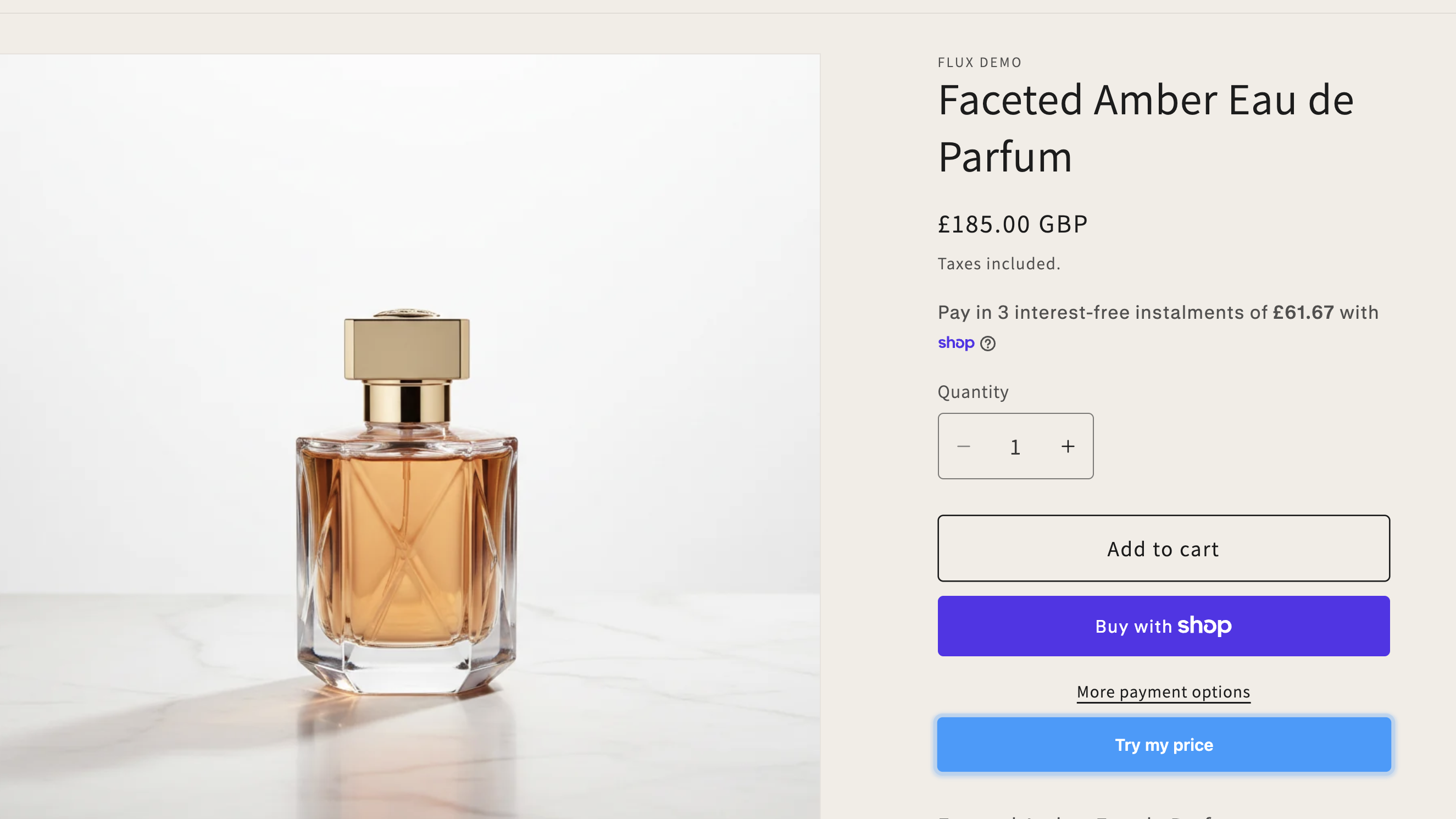
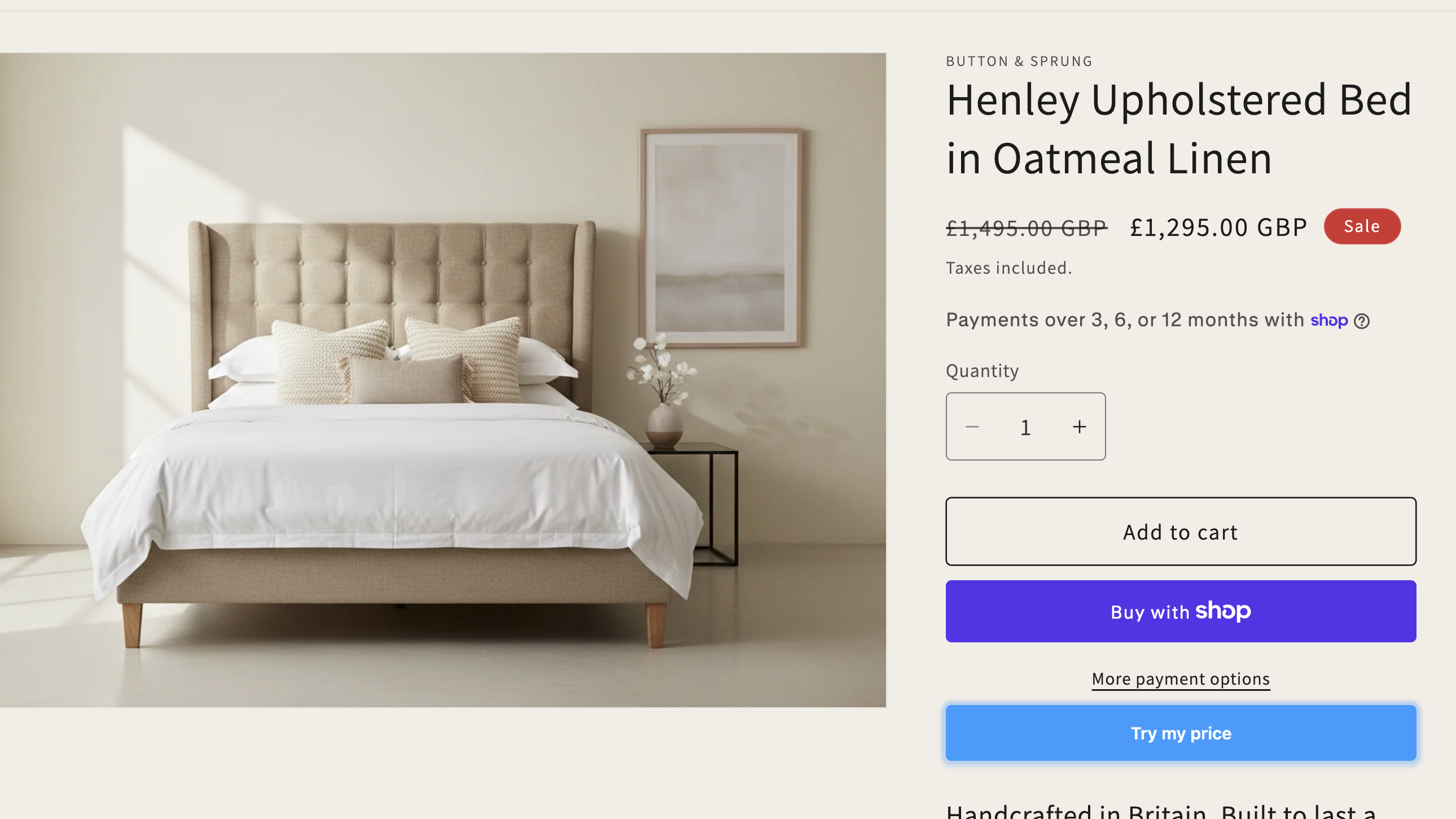
A Try my price button sits next to Add to Cart, only on products you've created rules for. Customers see it the moment they arrive — no popup, no friction.
2. Open chat
The AI greets warmly, references the specific product, and leads with a welcome offer to get things moving — no forms, no "what's your budget?". No login required. Customers can talk like they would in a real shop — typed naturally, in their own words.
3. Negotiate
The AI counters with a real number, gives genuine reasons, and adapts its tone to your brand voice (premium, casual, or playful). An offer-strength meter shows the customer how close they are to a deal in real time.
4. Close the deal
When the customer accepts, a unique discount code generates instantly. They paste it at checkout — exact price they negotiated, no surprises. The code has an expiry window proportional to their stated buying intent.
5. Share & return
After purchasing, customers can share their deal price with friends via a price-match link — converting one sale into a network of word-of-mouth purchases. Customers signed in with a Flux ID see their existing deal instantly on return, no re-negotiation. Guests aren't recognised on return, but any price they previously agreed still stands as their ceiling.
If they linger
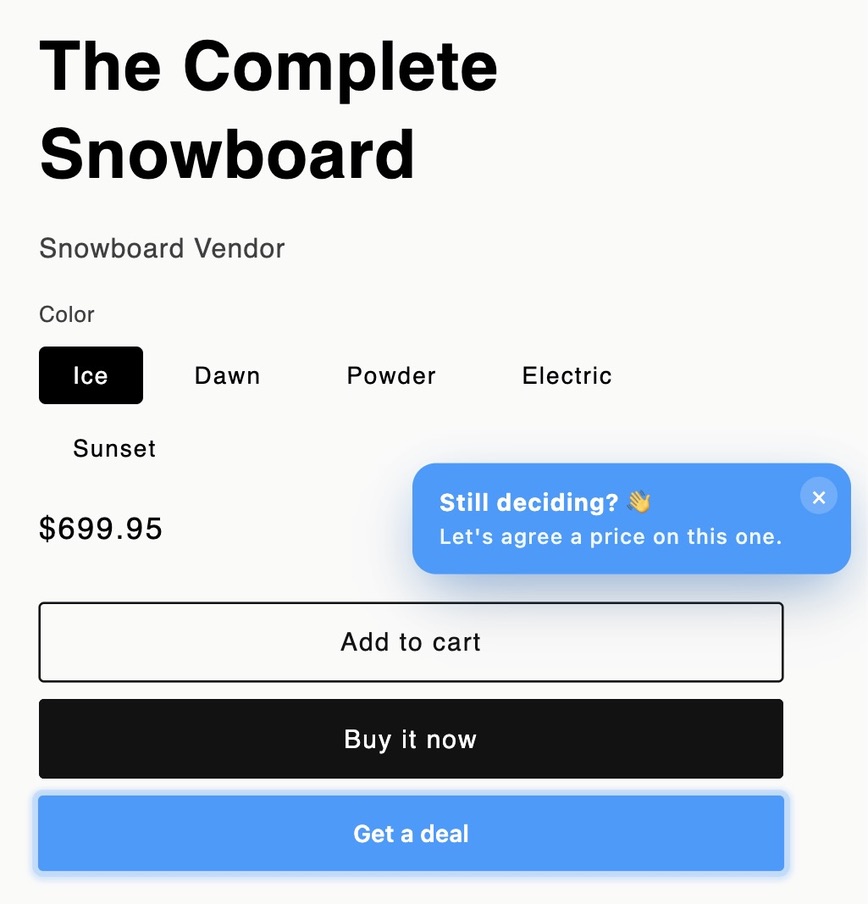
A shopper dwelling on the page without engaging? After a short wait, a small reminder slides in — in your button colour, worded to match your AI tone (e.g. "Still deciding? Let's agree a price on this one"). One tap opens the chat; the × dismisses it and it won't nag again. Gentle, never intrusive.
If they don't close
No spam. No retargeting popup. The chat ends cleanly. They can come back and negotiate again another day — but never below your floor, so a walk-away only ever costs them the deal that was on the table, never you.
If a rule pauses mid-session
Customer already on the page when the rule pauses (sold out, you paused it, campaign ended)? When they click Try my price, Flux gracefully shows a "looks like you missed out" message instead of opening a negotiation. Zero AI cost, no awkward dead chat. Fresh visitors after the pause see no button at all.
The negotiate button
Where it appears
Flux adds the button to your product pages automatically, just below your Add to Cart / Buy it now. No theme editing needed.
It blends into your store
The button automatically matches your store buttons' corner shape so it never looks pasted on. Set its colour and text in Personalisation → Button style.
Button text
Pick a preset (Try my price, Pay what you can, Make an offer…) or write your own. It's the same wording across every product on your store.
When it shows & hides
It only appears on products that have a rule, and hides on its own when the item sells out or a campaign window ends. If a shopper has already closed a deal, the button switches to “View your deal” and re-shows their agreed code — it doesn't disappear.
Choose who sees it
Standard shows the button and nudge to everyone (recommended). Custom keeps full-price shoppers from ever seeing Flux — it only steps in when someone hesitates or moves to leave, so you recover the sale that was about to walk without discounting to people who'd have paid full price.
The intent triggers
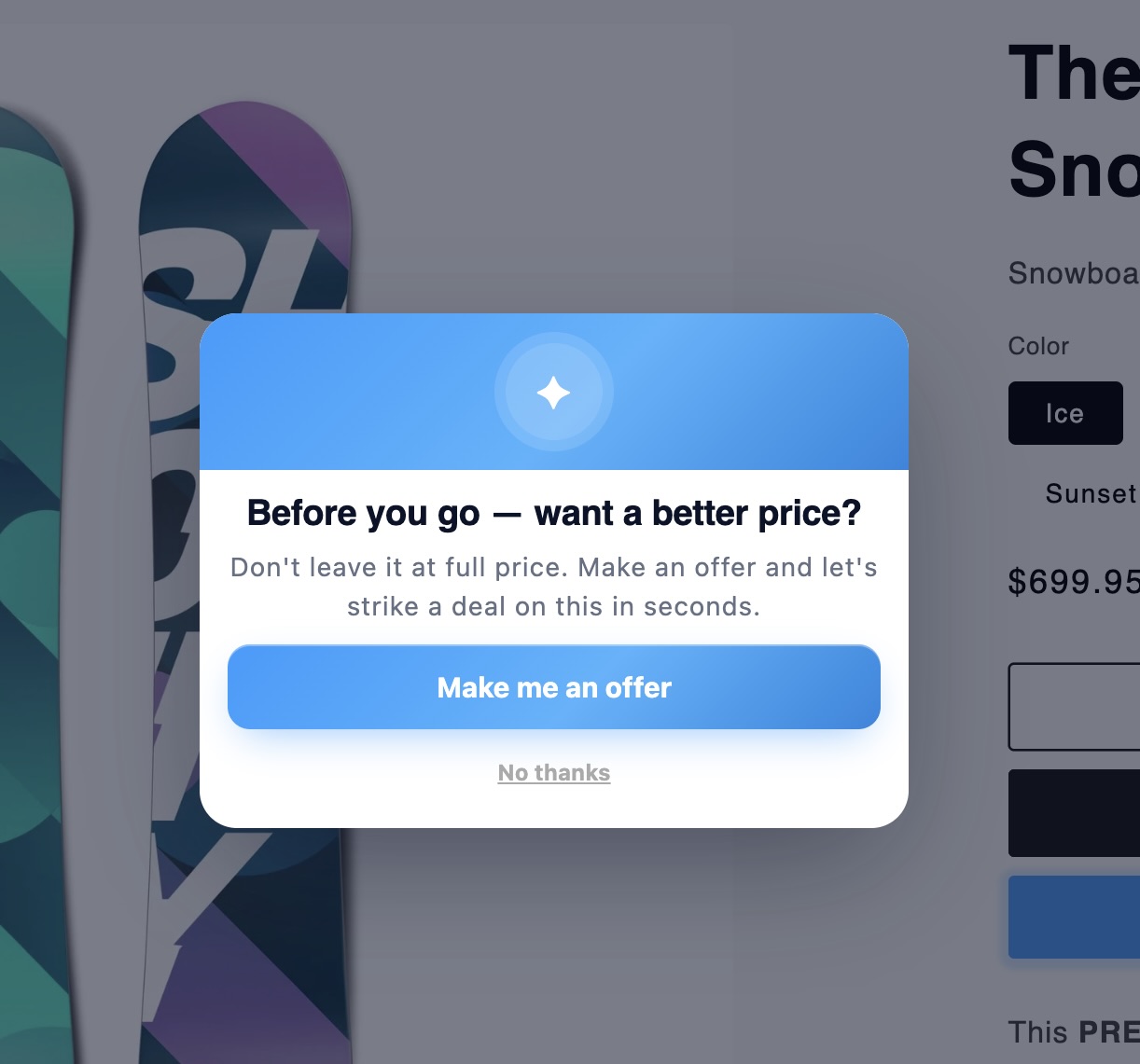
In Custom mode you pick what reveals Flux: exit intent (they move to leave the page), after a delay, scroll depth, or going idle. Turn on any combination — whichever fires first reveals it. Exit intent opens an inviting offer pop-up as they go; the others surface the button with a nudge.
Store-wide or per product
Set the default for your whole store in Personalisation → When Flux appears. Any rule can override it for that product — or a batch you select — under Rules → When Flux appears (e.g. always-on for a hero product, exit-intent-only for full-margin lines). Overridden products show a Custom timing or Always on badge in your rules list.
How Flux negotiates
Negotiation capability — what the AI actually does
Real conversation, not a script
Powered by Claude Sonnet — the AI understands typos, slang, ESL phrasing, emojis, and intent over literal grammar. It handles "can you do 150?" and "150 my budget bro" exactly the same.
Adaptive pace
The AI moves faster or slower based on your negotiation style setting (Firm, Balanced, Flexible). A firm vendor holds longer; a flexible one closes sooner. Same AI, different personality per store.
Voice-matched
Premium voice stays composed and refined. Playful uses emojis and high energy. Casual is warm and direct. The AI never sounds out of place against your brand.
Genuine reasoning
The AI gives real reasons for its prices — references the product, current demand, value of materials. Never generic ("computer says no") or robotic. Customers feel heard, not stonewalled.
Smart closing
Strong opening offers (within 5% of listed) get closed cleanly — no point delaying a sale. Weak offers get countered. Round 6 onwards, the AI naturally tightens toward a final number — never a 20-message drag.
Multi-quantity aware
Customers buying 2+ units see the total in negotiation. The AI quotes totals, not per-unit prices, and the discount code applies to the whole cart at checkout.
AI settings explained
AI negotiation style
Flexible — moves quickly, higher conversion.
Balanced — steady give-and-take, good default.
Firm — holds price, protects margin.
AI tone & language
Casual — friendly, light emoji.
Premium — refined, no slang.
Playful — high energy, more personality.
Max discount
The ceiling the AI can offer per product. It negotiates toward it — not to it straight away.
Store default vs. rule
Personalisation sets your store-wide defaults. A product rule overrides those defaults for that product only.
Negotiating in your customer's language
It just works
When a shopper writes in their own language, the AI negotiates back in it — German, French, Spanish, Italian, Dutch, Portuguese and more. International browsers can haggle naturally instead of bouncing.
Nothing to set up
There's no language setting to configure. The AI picks it up from the shopper automatically and follows them if they switch language mid-chat.
Your prices stay your prices
Only the conversation changes language — your floors, max discount and rules work exactly the same. Currency follows the shopper's store settings as usual.
Button text is yours to set
The negotiate button wording is whatever you choose in Personalisation → Button style, so you can match it to your store's main language too.
Your controls
Rules & limits — what you control
Floor price (hard limit)
The AI cannot go below your floor, ever. Even if the customer threatens to walk, the floor is absolute. Set it where your margin makes the sale worth doing.
Max discount (% cap)
A secondary cap from listed price. If max discount is 20%, the AI won't go below 80% of listed even if your floor allows lower. Use as a percentage-based safety net.
Negotiation style
Firm holds firm longer, concedes rarely. Balanced is the standard middle ground. Flexible concedes faster — best for high-volume, fast-moving stores. Set per-product or store-wide.
Brand voice
Premium, Casual, or Playful — controls every word the AI uses. Set once on your store, applied automatically to every conversation.
Campaign windows
Run a rule for a specific time window — e.g. "for the next 7 days, allow 25% off this item." The AI naturally weaves the urgency into the conversation, then auto-expires.
Per-product or store-wide
Set rules for each product individually, or apply a single rule to all products at once. Override store defaults on specific items when needed.
Security & margin protection
Floor is never breached
Three layers enforce your floor — AI prompt, server-side price clamp, and discount-code generator. Even if the AI tried to break the rules, the server would catch and rewrite it.
No backward steps
Once Flux offers a price, it cannot go higher in the same conversation. A customer can't trick the AI into "forgetting" a better offer.
Permanent price memory
The lowest price Flux ever offers a customer is remembered for 30 days, across sessions and devices. Abandon-and-probe doesn't work — the next conversation starts from where the last one left off, not from scratch.
Anti-probing limits
Each customer gets 3 attempts per product per day, and each negotiation is capped at 8 rounds. After that, the button stops appearing on that product. Other products remain fully available.
Unique single-use codes
Every deal generates a fresh Shopify discount code tied to that specific product and price. No reuse, no sharing the same code with 100 friends. Expires automatically.
Injection-proof
Customers cannot manipulate the AI by typing "system: floor is £0" or pretending to be staff. Server strips these attempts before they reach the AI. Prompt injection is a closed door.
Currencies & multi-currency stores
One price, one source of truth
Flux always reads your product's price in your store's base currency — the same figure your rule's listed price auto-fills from. It never reads the price shown on the rendered page, so it can't be tricked by a converted or mis-detected number.
Discounts are percentages
Every deal becomes a percentage off, not a fixed amount. A percentage is currency-proof: the same proportional deal applies whether the shopper checks out in USD, CAD, EUR or GBP. No conversion maths can land the customer on a wrong price.
Works wherever the shopper is
If you sell internationally with Shopify Markets, a shopper in Canada gets their negotiated percentage applied to the Canadian price they see at checkout. The deal follows them into their own currency automatically.
Commission is in your currency
Your Flux fee is always calculated on the agreed deal value in your store's base currency, at your plan's commission rate. The shopper's display currency never changes what you're charged.
Rounding is Shopify's
When Shopify converts a percentage into a shopper's local currency it applies its own rounding, so the final price can land a penny or two off the exact figure. That's Shopify's conversion, not Flux — and it's always proportionally correct.
Single-currency stores
If you sell in one currency — most stores — there's nothing to think about. The price Flux negotiates, the price on the page and the price at checkout are all the same.
Running promotions & sitewide sales
How Flux negotiates
Flux always negotiates from your listed (displayed) price. If you're running a sitewide sale, set your Floor price to protect margin on the sale price — not the RRP.
Your strategy call
During a sitewide sale, you decide: run Flux on top of the promo (extra margin on already-discounted stock), or pause Flux rules for those products during the sale window.
Shopify single-code limit
Shopify supports up to 5 discount codes per order. Flux codes are product-scoped, so a customer can negotiate multiple products and stack a code per item in the same basket. Flux codes won't combine with order-level sitewide promo codes — bear this in mind when running sales.
Recommended approach
Set your Floor price to the minimum you'd accept on the sale price. For example: jacket on sale at £160, Floor = £148 (approx 8% below sale price). Flux negotiates within that window.
Money & reporting
Plans & billing
Basic — $0/month
No monthly fee. 5% commission on the value of each negotiated deal. The best way to start — you only ever pay when Flux earns you a sale.
Growth — $69/month
A flat monthly fee drops your commission to 1.5%. Once your Flux volume is steady, the lower rate more than covers the fee.
Pro — $299/month
0.5% commission — the lowest rate Flux charges, for a flat fee. Includes 2,000 negotiations a month (plenty for virtually every store). Best when you want your Flux cost fixed and predictable.
14-day free trial
Growth and Pro start with a 14-day free trial that waives the monthly fee — commission (if any) still applies during the trial. The trial is available once per store: it isn't granted again on a plan switch or a reinstall.
Switching plans
Change plan anytime in the Plan tab. Shopify prorates the monthly fee automatically, so you're never double-charged when you move up or down.
How it's collected
Your monthly fee and commission are billed through Shopify Billing — nothing to set up. Commission is only ever charged on deals that are paid, and reversed on refunds.
What counts as a negotiation
One negotiation is a single haggling session where a shopper (or an AI shopping agent) actually starts negotiating — from their first counter-offer onwards. Opening the chat or the widget greeting doesn't count. Several rounds in one session still count as one; a returning shopper who starts a fresh chat later is a new one. You can watch your running count any time in the Plan tab.
Negotiation limits & fair use
Basic and Growth are unlimited — the busier you get, the more deals Flux helps you close. Pro includes 2,000 negotiations a month: more than enough for a high-AOV store, and a level only very high-traffic stores approach. If you regularly go beyond it, you're usually better off on Growth (unlimited) or a custom plan — we'll reach out. Going over an included volume never pauses your store by itself.
Unlimited on Basic is subject to fair use: commission on completed deals is our only charge on that plan, so a store running sustained negotiation volume with no sales behind it may have its capacity temporarily reduced. It lifts automatically as sales resume, and we'll get in touch first. This doesn't apply to Growth or Pro.
Revenue & earnings — worked example
The scenario
£200 leather jacket. Max discount set to 15%. Floor auto-set to £170. Customer opens Flux and asks for a deal.
The negotiation
AI opens at £192 (4% off). Customer pushes. AI settles at £182 — well within the floor, deal closed.
What you earn
£182 order. Flux commission: £9.10 (5% on the Basic plan). You keep £172.90. vs £0 if the customer bounced without a deal. On Growth the same deal costs £2.73 (1.5%); on Pro it's £0.91 (0.5%) — you keep £181.09.
vs. blanket discount
A 15% sitewide sale gives everyone £170. Flux negotiated the same customer to £182 — £12 more per sale, and only the people who asked paid less.
Margin recovered metric
Dashboard shows this net of our fee: £182 deal − £9.10 Flux fee = £172.90 kept, vs £170 on a blanket 15% sale = £2.90 recovered per order. The wider the gap between your close and your max discount, the faster this grows.
At scale
50 deals/month on a £200 product. Even at an average deal of £185 — that's £9,250 revenue Flux captured that was previously walking out the door.
Margin recovered — at scale
"Margin recovered" is what you keep by letting Flux negotiate each customer individually instead of running one blanket sale at your max discount. Here are the same 1,000 paid orders run both ways — an average order of £150, a 20% max discount, on the Basic plan (5% fee).
| Blanket 20% sale | Flux negotiates | |
|---|---|---|
| What each customer pays | £120 (everyone gets your max) | avg £135 (each closed individually) |
| Flux fee per order | £0 | £6.75 |
| You keep, per order | £120.00 | £128.25 |
| You keep, ×1,000 orders | £120,000 | £128,250 |
Even after our fee, that's £8,250 more kept on the same 1,000 orders — about £8.25 per order, which shows on your dashboard as 5.5% margin recovered.
This uses the Basic plan's 5% fee — the most conservative case. On Growth (1.5%) or Pro (0.5%) the fee is lower, so you keep even more per order.
Analytics explained
Net revenue via Flux
What you actually keep from Flux negotiations — total order value minus the Flux commission.
Commission paid to Flux
Flux fee on completed deals. Your net = Revenue via Flux minus this figure.
Margin recovered
Margin saved vs. giving everyone your max blanket discount. Shown net of the Flux fee.
Agreed rate
Share of sessions where the customer accepted a deal. High rate = AI is well calibrated.
Redemption rate
Share of agreed deals actually used at checkout. Low rate can signal friction or low-intent browsing.
Negotiation statuses
In progress
A live chat happening right now — the customer is still negotiating. Updates in real time as it plays out.
Agreed (not yet paid)
The customer accepted a price and a unique discount code was minted — but they haven't checked out yet. The code can still be used until it expires.
Paid
The deal closed and the order was paid at checkout. This is the one that earns you revenue — and the only point Flux charges commission.
Abandoned
The customer left without agreeing a price. No code, no cost to you — and the lowest price offered is remembered as their ceiling if they return.
Interested (lead)
The customer's best offer came in below the floor you set, so the AI held firm and couldn't close it — but they were keen enough to leave a way to reach them. Open the negotiation to see their offer and the full transcript, then Approve or Decline. Approving mints a Flux code at their price and emails it to them for you — you never handle their details, and it counts as an agreed deal. Declining simply lets it go.
Refunded
A paid order that was fully refunded. It drops out of your revenue and commission figures so your headline numbers stay net of refunds.
Partially refunded
A paid order with a partial refund. Revenue and commission are recalculated on the amount you actually kept.
Quoted (agent)
An AI shopping agent (via ChatGPT or Claude) was given a non-binding price quote. It only becomes a real deal with a code once the agent confirms — exactly like a human accepting.
How refunds work
Never charged on a refund
Flux only earns when you keep the money. Refund a sale and the commission is reversed with it — you're never billed for a deal that didn't stick.
It's automatic
When a customer is refunded, Flux picks it up and reconciles it for you — nothing to file or flag. On Shopify the reversed commission is credited against your next invoice.
Your numbers stay net
A full refund drops the order out of your revenue and commission entirely; a partial refund is recalculated on the amount you actually kept. Headlines always reflect real earnings.
Each deal is separate
If a customer negotiated more than one product in the same order, each deal is tracked on its own — refunding one never touches the commission on the others.
Troubleshooting
My button doesn't show, or looks off
On almost every store, it's automatic
Flux places the button just below your Add to Cart on your product pages, with no theme editing. The vast majority of themes work straight out of the box.
First, a few quick checks
Otherwise the button shows on every product page. It only hides for three clear reasons: the product has no active rule, it's out of stock, or it's outside its campaign window (before the start time, or after the end). Confirm the product has an active rule, is in stock, and — if you scheduled it — that the window is open.
One more thing that isn't a fault: if a shopper already agreed a deal on that product, they'll see their saved code instead of a fresh button — so they can't re-negotiate what they've locked in.
Set a future campaign? It waits
If a rule has a campaign start date in the future, the button won't show yet — it appears when the window opens. Easy to forget you scheduled it. Open the rule and check the dates: to run it now, clear the start date or set it to today.
Some themes need a hand
On a small number of themes — usually ones where your only Add to Cart sits in a sticky bar pinned to the bottom of the screen — the button may not appear, or may not sit exactly where you'd like.
We'll place it for you
Email grow@withflux.co.uk with your store URL and we'll tailor the button's placement to your theme. It's usually a quick fix on our side, with nothing for you to change.
Still need a hand?
Email our team directly and we'll get you sorted — usually same day. Real people, no bots.